
Best Programming Language to Learn First in 2026 (A No-Stress Beginner’s Guide)
If you’ve spent the last hour with twenty browser tabs open — half saying “learn Python,” the other half screaming “JavaScript is the only language that matters” — you’re not alone, and you’re not behind. Almost every beginner hits this exact wall before writing a single line of code.
Here’s the good news: this decision is much smaller than it feels. By the end of this guide, you’ll know exactly which language fits your goal, why that choice makes sense, and what to do today to get started.
What Does “Best Programming Language” Even Mean?
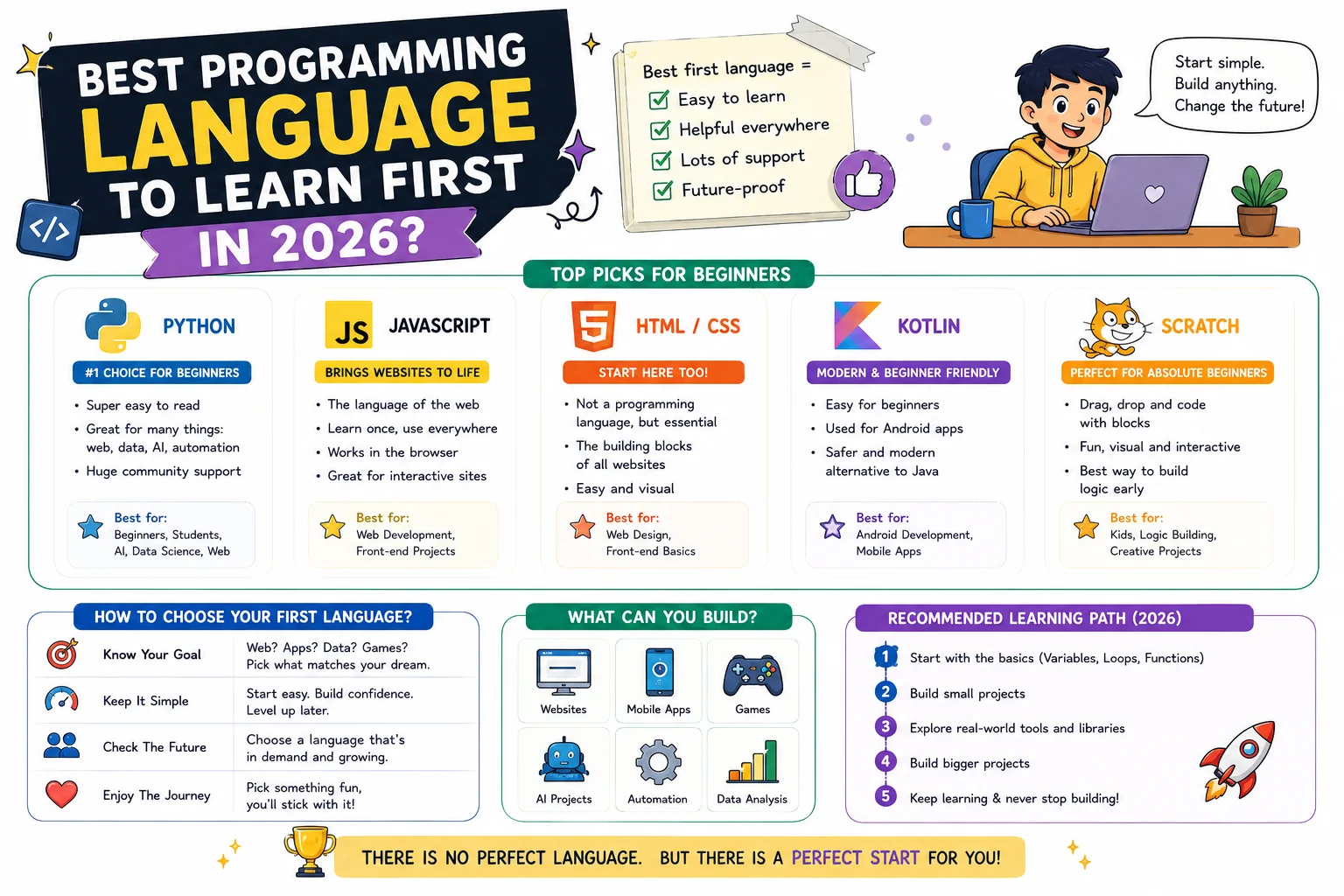
A programming language is a set of instructions you write that a computer can understand and carry out. Think of it as a translator between human ideas (“show this button when the user clicks here”) and the machine’s actual behavior.
When people ask for the “best” language, what they really mean is: which language will get me to my goal fastest, with the least frustration, and with real job or project value once I get there? That’s a different question for a future web developer than it is for a future data analyst — and that’s exactly why no single answer fits everyone.
- What do you want to build? Websites, apps, games, or data tools each point to different languages.
- How much time can you commit? Some languages get you to “I built something” faster than others.
- Do you care about job demand? Some languages have more beginner-friendly job openings right now.
- Are you comfortable with tech tools already? This affects how steep the learning curve will feel.
Quick-Decision Table: Your Goal → Your Language
| If you want to build… | Learn this first | Why |
|---|---|---|
| Websites & web apps | JavaScript | Runs in every browser; required for any interactive website |
| AI tools, data analysis, automation | Python | Simple syntax, huge AI/data community and tools |
| Android apps | Kotlin | Official language for Android development |
| iPhone/iOS apps | Swift | Official language for Apple platforms |
| Video games | C# or C++ | Powers major game engines (Unity, Unreal) |
| Databases & querying data | SQL | The standard language for storing and retrieving structured data |
| Backend systems & cloud tools | Go | Simple syntax designed for fast, scalable backend services |
| You’re not sure yet | Python | Easiest entry point with the most beginner resources |
You’ll also see TypeScript mentioned often once you start researching JavaScript — it’s not a separate language to choose instead of JavaScript, but a layer added on top of it that catches certain mistakes before your code even runs. It’s worth knowing the name exists, but it’s a “later” concept, not a first-language decision.
Why This Decision Matters More Than You Think
Your first language isn’t a life sentence — you’ll likely learn several languages over your coding journey. But your first one shapes how confident you feel in your first few months, and confidence is what keeps beginners going past the point where most people quit.
One more thing worth addressing directly: with AI coding assistants everywhere in 2026, some beginners wonder if learning to code is still worth it at all. It is — AI tools write code faster, but they still need someone who understands logic, can spot mistakes, and can guide them toward a working solution. Understanding a language is what turns you from someone who uses AI tools into someone who can direct them.
Before worrying about AI tools, programming languages, or career paths, it’s worth understanding the foundation itself. Explore What Is Coding to learn how software is actually created.Does It Matter How You’re Learning?
Not really — the same decision logic applies whether you’re a complete beginner exploring coding for the first time, a self-taught developer building skills outside a classroom, a career changer moving into tech from another field, or a student weighing a coding bootcamp against a full computer science degree. Your goal still decides your language. What changes by path is mainly pace and structure — a bootcamp or degree program will often choose the language for you, while self-taught learners get to apply the decision table above directly.
Real-Life Analogy: Choosing a Language Is Like Choosing Your First Vehicle
Imagine you’re learning to drive for the first time, and you have to pick your first vehicle.
- Python is like an automatic car. Fewer controls to think about, smoother to operate, and you’re moving forward quickly without stalling.
- JavaScript is like a hybrid car that works everywhere. City streets, highways, long trips — it adapts to almost any environment, just like JavaScript runs in browsers, servers, and even mobile apps.
- C++ is like a manual sports car. More control, more power, but a steeper learning curve before you feel comfortable — which is exactly why it’s used for high-performance work like game engines.
None of these vehicles is “the best car ever made.” They’re built for different roads. The same is true for programming languages.
How Programming Languages Actually Work (No Jargon)
When you write code, the computer doesn’t understand English-like words such as print or if directly. Your code needs to be translated into a language the computer’s hardware understands — this translation happens in one of two ways:
Compiled languages
The entire program is translated into machine code before it runs, using a tool called a compiler. Think of it like translating an entire book before handing it to the reader. C++ and Java work this way (with some nuance for Java).
Interpreted languages
The code is translated and run line-by-line, on the spot, using a tool called an interpreter. This is like having a live translator speaking sentence by sentence as someone talks. Python and JavaScript work this way, which is part of why they feel faster to test and experiment with as a beginner.
Visual Explanation: Where Each Language Lives
Syntax Compared: Same Task, Four Languages
Syntax is simply the set of grammar rules a language uses — just like English has grammar rules, so does code. Here’s the exact same task (“print a greeting”) written in four beginner-relevant languages, so you can see how each one “feels.”
Python
JavaScript
Java
C++
Notice the pattern: Python needed one line. JavaScript needed one functional line. Java and C++ required extra setup (a “class” or “include” statement) before they could even run. This is the syntax difference people mean when they call a language “beginner-friendly” — fewer required rules before you see a result.
print() or console.log()). You’ll meet functions properly in your next lesson — for now, just know they’re how languages “do” things.One More Syntax Idea Worth Knowing: Typing
You’ll also see languages described as dynamically typed or statically typed. This refers to when the language checks that your data is the correct type (like making sure a number isn’t accidentally treated as text).
- Dynamically typed languages (Python, JavaScript) check this while the program runs, which feels faster and looser for beginners.
- Statically typed languages (Java, C++, and TypeScript when added to JavaScript) check this before the program runs, which catches certain mistakes earlier but requires more upfront rules.
Neither approach is “better” — dynamic typing tends to feel friendlier for absolute beginners, while static typing becomes valuable as projects grow larger.
Other Languages You’ll Hear About (And Where They Fit)
As you research further, you’ll run into names beyond the core list above. Knowing roughly what they’re for helps you avoid distraction and confusion:
- Ruby — known for readable syntax similar to Python; historically popular for web backends through the Ruby on Rails framework.
- PHP — an older but still widely used language that powers a large share of the web’s backend, including WordPress.
- Rust — valued for speed and memory safety; not beginner-first, but increasingly common in systems-level and performance-critical software.
- C# — Microsoft’s language, used for Windows applications, enterprise software, and (alongside C++) game development with the Unity engine.
- SQL — technically a query language rather than a general-purpose programming language, but essential the moment you work with any database.
Step-by-Step: How to Choose and Start This Week
Step 1 — Define Your Goal in One Sentence
Write it down: “I want to build ___.” A website? A mobile app? A tool that automates something boring at work? This sentence drives every decision after it.
Step 2 — Match Your Goal Using the Decision Table Above
Find your goal in the table and note your matched language. Don’t overthink this step — switching later is far easier than people assume.
Step 3 — Install a Beginner-Friendly Code Editor
A code editor is the program you’ll write your code in (similar to how Word is where you write documents). Visual Studio Code (free) works for every language on this list.
Step 4 — Write and Run Your First Line of Code Today
Use the matching example above. Getting one program to run today — even a one-line “Hello, World!” — builds real momentum.
Step 5 — Commit to 30 Days Before Judging the Language
Every language feels awkward in week one. That’s normal, not a sign you chose wrong.
Common Mistakes Beginners Make
Best Practices for Beginners
- Pick one language and commit for at least 30 days before reconsidering.
- Build something small in week one — even a simple calculator or greeting program counts.
- Use official documentation and beginner-specific resources instead of jumping between unrelated tutorials.
- Learn fundamentals before frameworks — variables, data types, and logic come first.
- Re-evaluate your language choice only after genuinely trying it, not after one frustrating afternoon.
- Start tracking your code with version control early — a tool like Git (often used through GitHub) saves every version of your project, so mistakes are never permanent. It’s not a language, but nearly every developer relies on it from day one.
Real Projects Built With Each Language
| Language | Beginner Project Example | Real-World Equivalent |
|---|---|---|
| Python | A script that renames files automatically | Automation tools, data dashboards, AI models |
| JavaScript | An interactive to-do list on a webpage | Gmail, Netflix’s interface, almost every website |
| Kotlin | A simple note-taking Android app | Most Android apps on the Play Store |
| Swift | A basic habit-tracker iOS app | Apps on the Apple App Store |
| C#/C++ | A simple console-based number-guessing game | Games built in Unity and Unreal Engine |
Practice Exercises
- Define your goal: Write one sentence describing what you want to build.
- Match yourself: Use the decision table to pick your language.
- Install your tools: Set up a free code editor like VS Code.
- Run your first program: Copy the matching “Hello, World!” example above and get it running.
- Spot it in the wild: Name one app or website you use daily, and guess which language likely powers it.
Quick Quiz: Test What You’ve Learned
Frequently Asked Questions
Is Python still the best language to learn in 2026?
For most total beginners, yes — especially if your goal involves data, AI, or you’re simply unsure where to start. Its simple syntax means fewer rules to memorize before you see real results.
Should I learn JavaScript or Python first?
Choose JavaScript if you want to build websites or web apps. Choose Python if your interest leans toward data, AI, automation, or you’re not sure yet and want the gentlest learning curve.
Do I need math to learn programming?
No. Most beginner and professional coding relies on logical thinking, not advanced math. Basic arithmetic is usually enough to get started.
How long does it take to learn a programming language as a beginner?
You can write working basic programs within a few weeks of consistent practice. Feeling comfortable and job-ready typically takes several months of regular learning and building real projects.
Can I get a job knowing only one programming language?
Yes. Many entry-level developer roles focus on depth in one language plus its common tools, rather than knowledge of many languages.
Will AI tools replace the need to learn programming?
Not for understanding logic and solving real problems. AI tools can write code faster, but you still need to understand what the code does, spot errors, and guide the AI toward a correct solution.
What’s the difference between a programming language and a framework?
A programming language is the foundational set of rules you write code in. A framework is a pre-built toolkit, written in that language, designed to speed up common tasks — like React speeding up JavaScript web development.
Should I learn HTML/CSS before a “real” programming language?
HTML and CSS aren’t programming languages — they’re markup and styling languages that structure and design web pages. They’re useful to know for web development, but they don’t replace learning an actual programming language like JavaScript.
Do I need a coding bootcamp or computer science degree to learn a language?
No. Many working developers are self-taught. Bootcamps and degrees add structure, credentials, and (for degrees) deeper theory like data structures and algorithms — but the language itself can be learned independently with consistent practice and the right resources.
Summary
There’s no universal “best” programming language to learn first — there’s only the best language for your specific goal. Match your interest (web, data, mobile, games) to the right starting language, write your first working program this week, and give yourself a real 30 days before second-guessing the choice. The language is just the vehicle — the destination is what matters.
Key Takeaways
- Your goal — not hype — should decide your first programming language.
- JavaScript → web development. Python → data, AI, automation. Kotlin/Swift → mobile apps.
- If you’re unsure, Python is the most beginner-friendly overall starting point.
- Syntax differences (how much code you need to write) are a major part of “beginner-friendliness.”
- Math skills are not a prerequisite — logical thinking is what actually matters.
- Commit to one language for 30 days before judging it or switching.
Related Concepts to Learn Next
- Variables — how programs store and label information
- Data Types — the different kinds of information a program can handle
- Syntax Rules — the grammar of your chosen language
- Setting Up a Coding Environment — installing the tools you need to start writing real code
- Static vs Dynamic Typing — how different languages handle data type checking
- Version Control with Git — tracking and saving changes to your code as you build
- Next step: Variables — once you’ve picked your language, Variables is your true starting point.
- Related comparison: Python vs JavaScript for Beginners — a deeper side-by-side if you’re stuck between the two most common picks.
- Related concept: Programming Language vs Framework vs Library — clears up one of the most common beginner mix-ups.
- Foundational read: Is Math Required for Coding? — for anyone still hesitating because of school math anxiety.
- Supporting read: What Is Git and Why Every Beginner Should Learn It Early — the most common “second tool” after a first language.