What Is a Syntax Error? A Friendly Beginner’s Guide
If your code just threw a “syntax error” and you have no idea what that means — relax. You’re about to understand it completely, in plain English, with real examples.
You wrote your very first piece of code. You hit run. And instead of seeing your program work, you got a wall of red text that said something like SyntaxError: invalid syntax.
Take a breath. This is completely normal. In fact, a syntax error is usually the very first error every single programmer sees — including the ones who now build apps used by millions of people.
A syntax error happens when your code breaks the grammar rules of a programming language — like a missing colon, bracket, or quotation mark. The computer can’t understand the instruction, so it refuses to run any of the code until the mistake is fixed.
In this guide, you’ll learn exactly what a syntax error is, why it happens, how to read the scary-looking error message, and how to fix it quickly — with real code examples in both Python and JavaScript.
What is a Syntax Error?
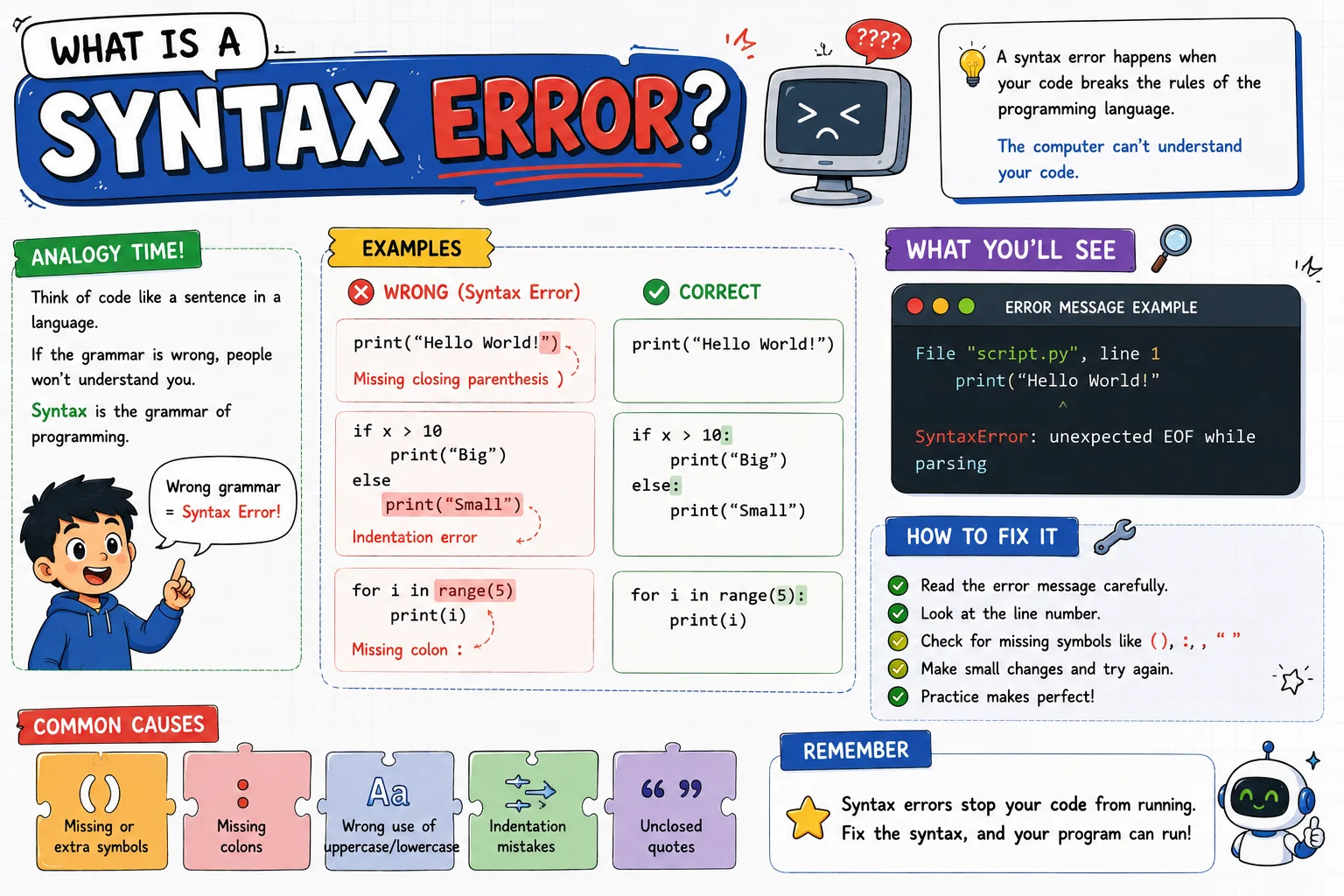
A syntax error is a mistake in the structure or spelling of your code that breaks the grammar rules of the programming language you’re using. It’s not a problem with your idea — it’s a problem with how that idea was written.
The Slightly More Technical Definition
Every programming language — Python, JavaScript, Java, and so on — has its own set of rules for how code must be written. This set of rules is called syntax. When your code doesn’t follow those rules, the computer can’t even begin to process it. It stops immediately and shows you a syntax error message instead of running your program.
Syntax Error in Plain English
Think of syntax as the “spelling and grammar” of code. A syntax error is what happens when you accidentally break that grammar — even by something as small as forgetting one character.
Why It Matters
Here’s something most beginners don’t realize: computers cannot guess what you meant. A human reading a sentence with a typo can usually still understand it. A computer cannot. It needs every rule followed exactly, every time.
This is actually a good thing. Imagine if your computer just “guessed” what you meant whenever your code was a little off — you’d get unpredictable results, and bugs would be nearly impossible to track down. A syntax error stops your program before it runs, so you fix the mistake early instead of dealing with confusing problems later.
Want to build a stronger foundation before moving on to advanced topics? Explore more beginner-friendly lessons at Basic Coding Concepts.Understanding syntax errors is also your first step toward becoming a confident debugger — a skill every developer uses every single day, at every level of experience.
Real-Life Analogy
Let’s make this concept impossible to forget using everyday comparisons.
The Broken Sentence
“I to want eat” doesn’t make sense. The words are right, but the order breaks English grammar — just like code breaks programming grammar.
The Recipe Card
A recipe that says “Add 2 eggs” but forgets to close a step properly confuses the cook. Code works the same way — every step must be complete.
Traffic Rules
You can’t drive through a red light because “you understood the road.” Rules must be followed exactly — code syntax is just as strict.
In each case, the idea might be perfectly clear to a human — but the structure is wrong, and that structure has to be followed exactly. That’s exactly what a syntax error is in programming.
How It Works
So what actually happens behind the scenes when you run code with a syntax error? Here’s the simple version:
You write code
You type your instructions into a code editor — just like writing a sentence.
The interpreter or compiler reads it
Before your program can run, a part of the language called the interpreter (used by Python, JavaScript) or compiler (used by Java, C++) scans your code first.
The code gets broken into tokens
A part of the interpreter called the lexer (or tokenizer) splits your code into small pieces called tokens — things like keywords, brackets, and variable names. Think of this as chopping a sentence into individual words before checking the grammar.
The parser checks the grammar
Next, a component called the parser looks at those tokens and checks whether they’re arranged in a way the language’s grammar allows. This is the exact moment a syntax error gets caught — the parser expected something (like a colon or a closing bracket) and it simply wasn’t there.
The error is reported — or the code runs
If a rule is broken, you instantly get a syntax error message and the program never runs. If everything follows the rules, your code moves on to actually executing.
This is the key idea to remember: a syntax error happens before your program even starts running. Your computer isn’t being mean — it genuinely cannot begin until the grammar is correct. That’s why programmers call this a compile-time (or “parse-time”) problem rather than a runtime problem. A runtime error, by contrast, only shows up after your program has already started executing successfully — the grammar was fine, but something went wrong while the instructions were actually carried out, like dividing a number by zero.
Visual Explanation
Anatomy of a Syntax Error Message
Error messages look intimidating, but they’re actually trying to help you. Here’s a real Python error, broken down piece by piece:
if age > 18
^
SyntaxError: expected ‘:’
Once you know how to read these four parts, error messages stop being scary — they become a map that leads you straight to the fix.
Syntax Breakdown
“Syntax” simply means the building blocks every language uses. Here are the most common ones beginners run into:
- Keywords — special reserved words like
if,for,def, orfunctionthat must be spelled exactly right. - Statements — a complete instruction, like assigning a value to a variable or printing text to the screen. Each statement is one “sentence” of code.
- Expressions — smaller pieces that produce a value, like
age + 1or"Hello" + name. Statements are often built from one or more expressions. - Punctuation — colons, commas, and semicolons that tell the computer where one instruction ends and another begins.
- Brackets, parentheses, and braces —
(),[], and{}always need an opening and a matching closing symbol. - Indentation — in Python, spacing isn’t just for looks; it’s part of the actual grammar.
- Quotation marks — used to wrap text (called a “string”), and they must always be closed.
Different languages enforce these rules differently. Python relies heavily on indentation and colons. JavaScript relies more on semicolons and curly braces. That’s why the same mistake (like a missing bracket) can show up as a slightly different error message depending on the language.
Syntax Error vs Exception — What’s the Difference?
You’ll often hear the word exception used around programming errors too, so it’s worth clearing this up early. A syntax error means your code’s grammar is broken and nothing runs at all. An exception is different — it’s a problem that happens while your program is already running correctly, like trying to open a file that doesn’t exist. When Python reports an exception, it shows a traceback (a list of exactly which lines led to the problem) instead of the shorter syntax error format. You’ll learn more about this in our guide on runtime errors.
Code Examples
Let’s look at real broken code, see the actual error it produces, and then see the fix — side by side.
Example 1: Missing Colon (Python)
if age > 18
print("You can vote")if age > 18if age > 18:What the error says: SyntaxError: expected ':' — Python requires a colon after every if statement.
Example 2: Mismatched Parentheses (Python)
print("Hello, world!"print("Hello, world!"print("Hello, world!")What the error says: SyntaxError: unexpected EOF while parsing — the opening parenthesis never got a matching closing one.
Example 3: Missing Quotation Mark (Python)
name = "Sara
print(name)
name = "Saraname = "Sara"What the error says: SyntaxError: unterminated string literal — the text was opened with a quote but never closed.
Example 4: Missing Semicolon (JavaScript)
let score = 10
console.log(score)
This particular example might still run in modern JavaScript thanks to a feature called “automatic semicolon insertion” — but relying on that is risky. Cleaner, safer code looks like this:
let score = 10
console.log(score)let score = 10;
console.log(score);Example 5: Unclosed Curly Brace (JavaScript)
function greet() {
console.log("Hi!");function greet() {
console.log("Hi!");function greet() {
console.log("Hi!");
}What the error says: SyntaxError: missing } after function body — every opening brace { needs a matching closing brace }.
Step-by-Step Walkthrough
Here’s a simple, repeatable process you can use any time you see a syntax error, in any language:
Read the error type first
It tells you the category of mistake — for example, “unterminated string” means a quote wasn’t closed.
Check the file name and line number
Go straight to that exact line in your code editor.
Look at the caret (^) symbol
It usually points to the exact spot where the computer got confused.
Check the line above too
Sometimes the real mistake (like a missing bracket) is on the line before the one mentioned in the error.
Compare against the rule
Ask: does this line follow the syntax rules of the language? Missing colon? Missing bracket? Missing quote?
Fix it and run again
Make one change at a time, then re-run your code to see if the error is gone.
Common Mistakes
Forgetting the colon in Python
Every if, for, while, and def statement needs a colon at the end before the next line.
Mismatched brackets or parentheses
Every opening symbol needs exactly one matching closing symbol — and they need to be in the right order.
Inconsistent indentation
Mixing tabs and spaces in Python is one of the most common beginner headaches — stick to one style.
Misspelled keywords
Typing pritn instead of print looks like a small typo, but the computer reads it as a completely unknown word.
Assuming the error is always exactly on the line shown
Sometimes the real cause is one or two lines earlier — always check nearby lines too.
Best Practices (Beginner Tips)
Use a code editor with syntax highlighting
Editors like VS Code and PyCharm color-code your text and flag obvious issues before you even run the code.
Fix one error at a time
Fixing the first error often makes several others disappear automatically — don’t panic at a long list.
Read slowly, from top to bottom
Error messages are written in a specific order for a reason — skipping ahead often causes you to miss the real clue.
Test small chunks of code often
Running your code every few lines (instead of writing 50 lines at once) makes errors much easier to catch early.
Real Projects Using This Concept
Syntax errors aren’t just a “beginner problem” — they show up everywhere in real software development:
- Professional developers see syntax errors regularly, even with years of experience — typos happen to everyone.
- Linters (tools that check code style and correctness) catch syntax issues instantly inside professional code editors, before the code is even run.
- CI/CD pipelines — automated systems companies use to test and deploy code — will block a deployment entirely if a syntax error is detected.
- Technical interviews often test how calmly and logically you read an error message, not just whether you avoid mistakes.
Exercises
Exercise 1 — Spot the Error
What’s wrong with this line? for i in range(5)
Exercise 2 — Spot the Error
What’s wrong with this line? console.log("Done!"
Exercise 3 — Fix the Code
Rewrite this correctly: message = "Welcome
Exercise 4 — Explain the Error
If Python shows SyntaxError: expected ':', what should you check first?
Answer Key: (1) Missing colon at the end. (2) Missing closing parenthesis. (3) message = "Welcome" — add the closing quote. (4) Check that line for a missing colon after an if, for, while, or def statement.
Quick Quiz
1. A syntax error happens because of:
A) A wrong calculation B) Broken grammar rules in the code C) A slow computer
Answer: B
2. True or False: A syntax error means your program ran but gave the wrong result.
Answer: False — that’s a logical error, not a syntax error.
3. What does the caret (^) symbol usually point to?
A) The file name B) The exact spot of the problem C) The total number of errors
Answer: B
FAQ
What is a syntax error in simple words?
It’s a mistake that breaks the grammar rules of a programming language, so the computer can’t understand or run the code.
What’s the difference between a syntax error and a logical error?
A syntax error stops your code from running at all. A logical error lets your code run, but it produces the wrong result.
How do I fix a syntax error?
Read the error message, go to the line it mentions, compare that line against the language’s grammar rules, and correct the mistake.
Do professional programmers still get syntax errors?
Yes, all the time. It has nothing to do with skill level — even experienced developers make small typos.
Why does Python care so much about indentation?
Python uses indentation instead of curly braces to show which lines belong together, so spacing is actually part of its grammar.
What is a semantic error, and is it the same as a syntax error?
No. A semantic error means your code is grammatically correct and runs fine, but the meaning is wrong — like writing valid code that calculates a total incorrectly. Syntax is about grammar; semantics is about meaning.
What is the difference between syntax and semantics in code?
Syntax is the structure and grammar of your code — the rules about colons, brackets, and spelling. Semantics is what your code actually means and does once it runs correctly.
Summary
A syntax error simply means your code broke a grammar rule of the programming language you’re using — a missing colon, an unclosed bracket, or a missing quotation mark are the most common culprits. The computer stops before running anything until that rule is fixed. The good news? Once you learn to read the error message calmly, fixing it usually takes seconds.
Key Takeaways
- A syntax error breaks the grammar rules of a programming language.
- It happens before your code runs — nothing executes until it’s fixed.
- Common causes: missing colons, brackets, quotes, or misspelled keywords.
- Error messages tell you the file, line number, and exact problem spot.
- Syntax errors are different from logical errors and runtime errors.
- Every developer, beginner or expert, deals with syntax errors regularly.