
What Are Variables? The Basic Coding Concept Every Beginner Needs
The first time someone told me "store that value in a variable," I nodded like I understood. I had absolutely no idea what they meant. A variable is one of the most basic things in coding, and once you get it, everything else starts making sense.
By the end of this page, you'll be able to create, name, and change variables in real code, understand where the value actually lives in your computer's memory, and avoid the five mistakes that trip up every beginner — in plain English, with examples you can actually run.
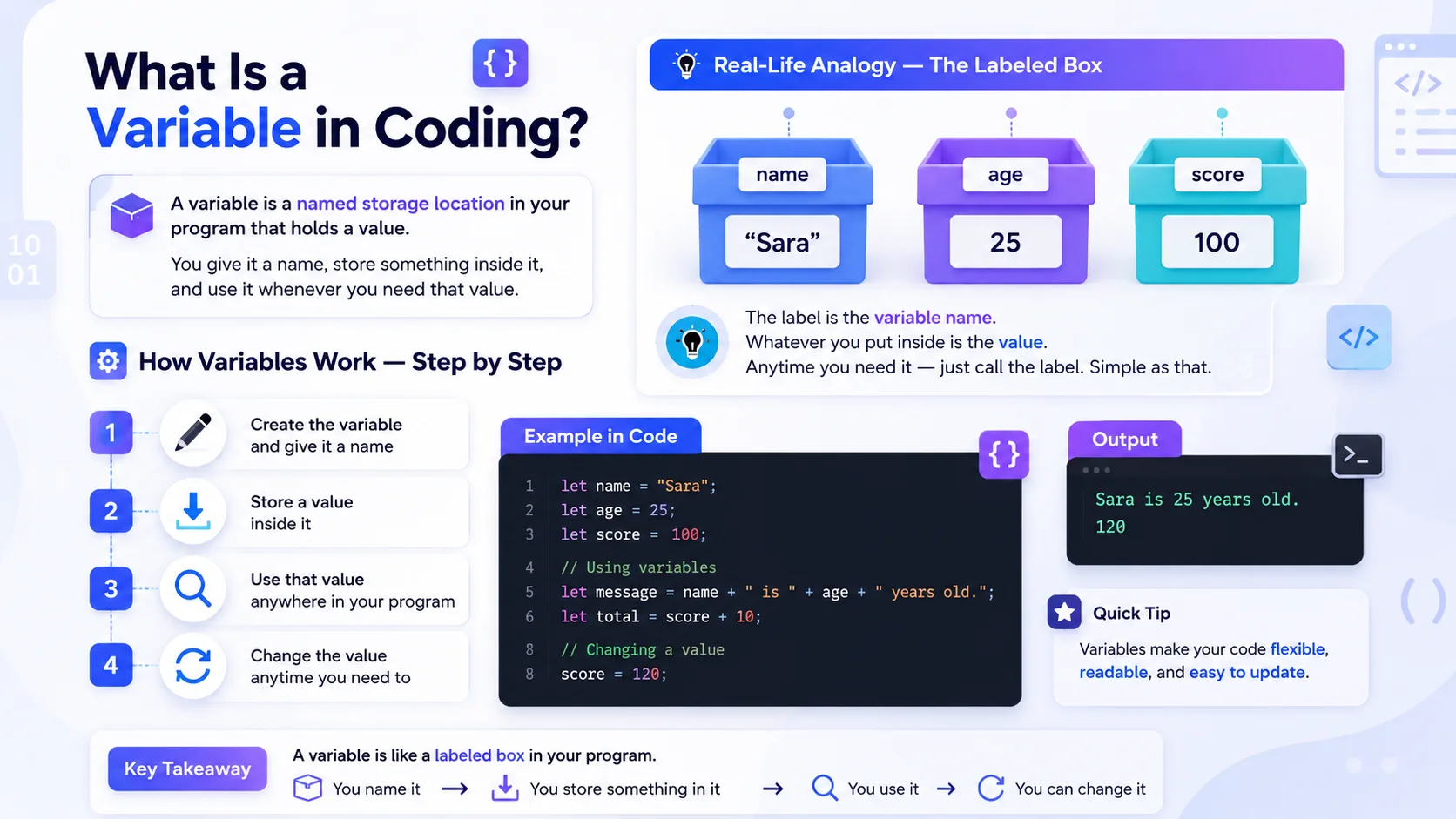
What Is a Variable in Programming?
How Variables Work — Step by Step
Real-Life Analogy — The Labeled Box
name"Sara"age25score100Where Does the Value Actually Go?
The part most tutorials skip — and the reason variables exist at all.
When you create a variable, your program reserves a small slot in the computer's memory (RAM) and puts the value there. Every slot in memory has a raw address — something ugly like 0x7F3A. Without variables, you would have to remember those addresses yourself every single time you wanted to store or fetch a value.
A variable name is simply a human-friendly label for a memory location. You say age — the language quietly translates that to the right address, walks over to that slot, and brings back whatever is inside. That is the entire magic trick.
name"Sara"age25score100How to Declare a Variable
Create, name, store — here's how it works in JavaScript, Python, and beyond.
Declaring a variable just means creating one. You tell the program — "I need a storage box, here's its name, and here's what goes inside."
Declaration vs Initialization — What's the Difference?
let age;age = 25;Most of the time you do both in one line — let age = 25; declares and initializes at once. You'll see both terms in error messages and documentation, so it pays to know them apart.
Declaring Variables in JavaScript
JavaScript gives you three ways to declare a variable — var, let, and const. Use let for values that change and const for values that stay fixed.
let name = "Sara"; // can change later

let age = 25; // can change later

const country = "USA"; // never changes
Declaring Variables in Python
Python keeps it simple. No special keyword needed — just write the name, an equals sign, and the value.
name = "Sara" # no keyword needed

age = 25 # Python detects the type

country = "USA" # just name = value
How does Python know that 25 is a number and "Sara" is text? This is called dynamic typing — the language works out the type from the value you assign. JavaScript does the same. Languages like Java and C++ are statically typed — you must state the type up front. The kinds of values a variable can hold are called data types in programming, and they get a full lesson of their own.
= is the assignment operator — it stores a value: age = 25. A double == is the equality operator — it asks a question: age == 25 means "is age equal to 25?" Mixing them up is one of the most common beginner bugs, and we cover both fully in operators in programming.The Same Variable in 4 Popular Languages
The idea never changes — only the syntax does. Here's how the same variable looks in the four languages beginners meet most often.
| Language | Declaring a Variable | Typing |
|---|---|---|
| JavaScript | let age = 25; | Dynamic |
| Python | age = 25 | Dynamic |
| Java | int age = 25; | Static |
| C++ | int age = 25; | Static |
int before the name — that's static typing in action. You're telling the compiler the type before the program even runs.var vs let vs const — What's the Difference?
| Keyword | Can Change? | When to Use | Status |
|---|---|---|---|
var | Yes | Old JavaScript — avoid as a beginner | Avoid |
let | Yes | When the value needs to change | Use This |
const | No | When the value stays the same | Best Practice |
const. If you need to change the value later, switch to let. Avoid var for now.What Are Constants in Programming?
Like a variable — but the value is locked forever.
A constant is like a variable — but with one rule: once you set its value, you cannot change it.
Difference Between a Variable and a Constant
A variable can be updated anytime. A constant is locked the moment you set it. Try to change it and your program throws an error.
let score = 10;

score = 20; // ✓ works fine
const PI = 3.14;

PI = 5; // ✗ error!
One exception to know: in Python, const doesn't exist at all. Constants are just a naming convention — write the name in ALL_CAPS (like MAX_USERS = 10) so other developers know not to change it, but Python won't stop them if they do.
When to Use a Constant
const. It protects your data from accidental changes.Variable Naming Rules Every Beginner Must Know
Rules You Must Follow
_, or $1name is invalidcamelCase or snake_caselet, if, returnname and Name are different variablesBest Practices for Naming Variables
let userName;

let totalPrice;

let isLoggedIn;

let maxRetries;
let x;

let a1;

let temp;

let data;
totalPricetotal_priceTotalPriceVariable Scope — Local vs Global
Where you create a variable decides where you can use it.
Scope means — where in your program a variable can be used. Not every variable is available everywhere. Where you create it decides where you can use it.
{ } braces.Global Variables
A global variable is created outside any function. It can be used anywhere in your program — from top to bottom, inside or outside functions.
Local Variables
A local variable is created inside a function. It only exists inside that function. Try to use it outside — your program throws an error immediately.
let globalName = "Sara"; // accessible everywhere
function greet() {
let localMsg = "Hello!"; // local only
console.log(globalName); // ✓ works
}
console.log(localMsg); // ✗ error — not accessible here
let and const are technically block-scoped — they live inside the nearest pair of { } braces, which includes functions, loops, and if-statements. And if you create a local variable with the same name as a global one, the local version "wins" inside its block — that's called variable shadowing, and it's legal but confusing to read, so most style guides avoid it.5 Variable Mistakes Every Beginner Makes
And the exact error messages they cause — so you recognise them instantly.
Every programmer has made all five of these. Learning to read the error message is half the skill — here's what each one looks like and how to fix it.
Using a variable before creating it
console.log(userName); // used first...
let userName = "Sara"; // ...declared afterReferenceError: Cannot access 'userName' before initializationTrying to change a constant
const maxUsers = 10;
maxUsers = 20; // nope!TypeError: Assignment to constant variable.let instead of const.The capital-letter typo
let userName = "Sara";
console.log(username); // lowercase n — different variable!ReferenceError: username is not defineduserName and username are two completely different variables — check every capital letter.Using = when you meant ==
if (score = 100) { // assigns 100 instead of comparing!
  console.log("Perfect score!");
}No error at all — the worst kind of bug. It silently overwrites your value.== (or better, === in JavaScript) when comparing. Single = only ever stores a value.Declaring the same variable twice
let score = 10;
let score = 20; // re-declared with let!SyntaxError: Identifier 'score' has already been declaredscore = 20; — no let.FAQs About Variables in Programming
Quick answers to the questions beginners ask most
What are the variables in a code?
let userName = "Sara"; // name + value

let userAge = 25; // another variable

console.log(userName); // prints "Sara"
What are the 4 types of variables in programming?
"Sara", "Hello"25, 3.14, 100true, false["red", "blue"]Can a variable store multiple values?
// Array — stores a list of values

let colors = ["red", "blue", "green"];


// Object — stores key-value pairs

let user = { name: "Sara", age: 25 };
What is the difference between a variable and an identifier?
greet in function greet() {} is an identifier for a function, not a variable.SyntaxError: Identifier 'score' has already been declared above) — now you know exactly what it's referring to.