
When I wrote my very first program, I had no idea how to make it talk to the user. I could write code — but it just sat there, doing nothing visible.
Then I learned about input and output. Suddenly my programs could ask questions and show answers. That’s when coding actually felt real.
If you’re just starting out with basic coding concepts, this is one of the most satisfying things you’ll learn. Let’s break it down simply.
What Is Input and Output?
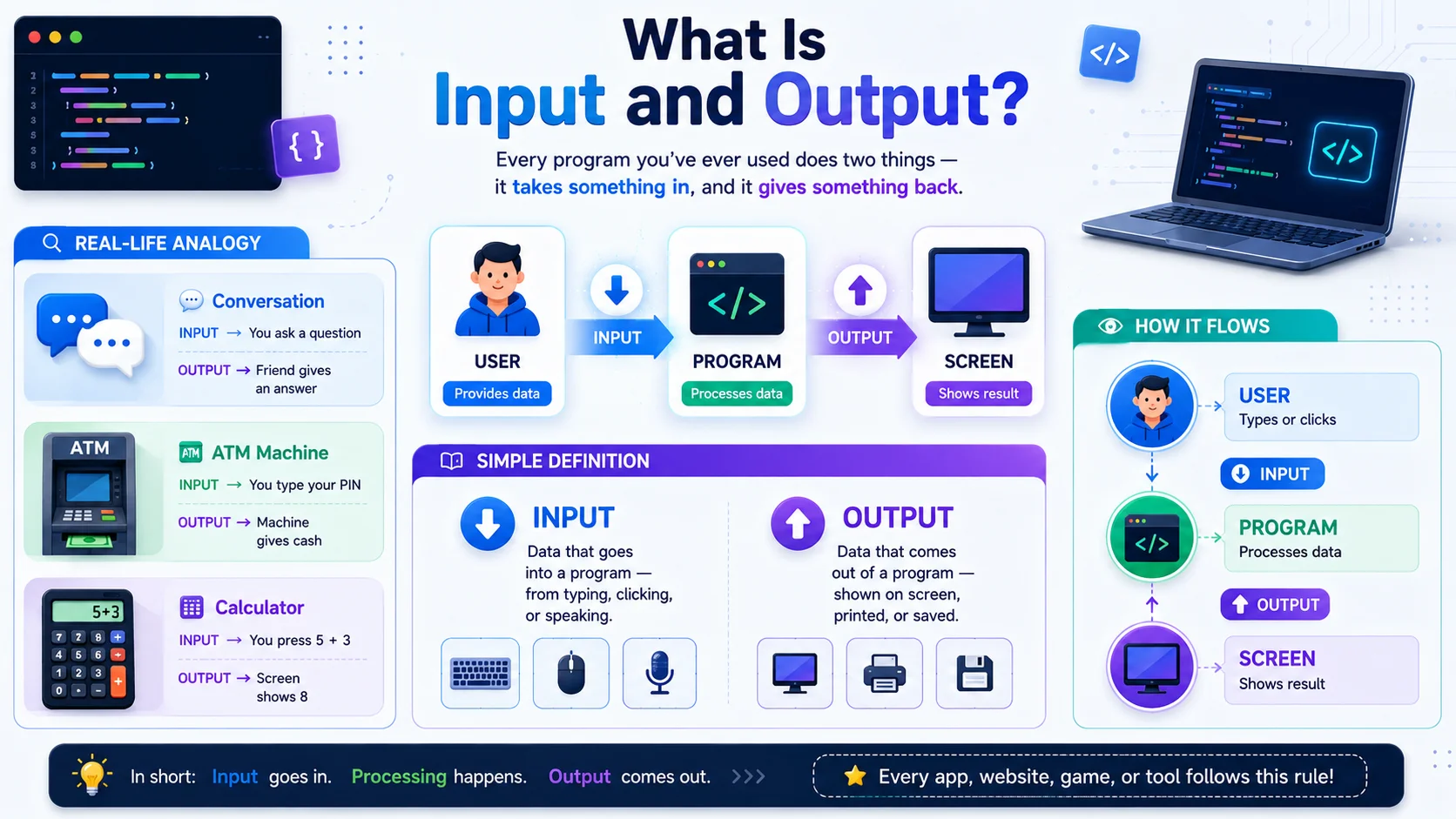
Every program you’ve ever used does two things — it takes something in, and it gives something back. That’s input and output. Simple as that.
Real-Life Analogy — You Already Know This
You deal with input and output every single day — just not in code. Here are three examples you’ll recognize instantly:
Simple Definition
Input
Data that goes into a program — from a user typing, clicking, or speaking
Output
Data that comes out of a program — shown on screen, printed, or saved
How It Flows — User → Program → Screen
What Is Output in Programming?
Output is how your program speaks. It’s the result your code shows — on screen, in the console, or anywhere the user can see it.
Output in JavaScript + Python
Every language has its own way to show output. The two most beginner-friendly ones are console.log() in JavaScript and print() in Python.
Prints output to the browser console. Press F12 in any browser to see it. Used for displaying values, testing code, and debugging.
Prints output directly to the terminal screen. The simplest and most used function in Python — beginners use it in almost every program.
console.log() or print() to check what value your variable actually holds. This is called debugging — and it’s something every developer does daily.Code Examples — JS + Python
You can print text, numbers, and even variables. Here is how both languages handle it:
console.log(“Hello, World!”);
// Output a number
console.log(42);
// Output a variable
let name = “Sara”;
console.log(“Hello, “ + name);
// OUTPUT → Hello, World! 42 Hello, Sara
print(“Hello, World!”)
# Output a number
print(42)
# Output a variable
name = “Sara”
print(“Hello,”, name)
# OUTPUT → Hello, World! 42 Hello, Sara
print() or console.log(), you’re just telling your program: “Display this right now.”More Console Methods in JavaScript
console.log() is not the only output method in JavaScript. The console has a few more — each one shows output in a different color so you can spot issues fast.
console.warn(“Double check this”); // ⚠️ yellow
console.error(“Something broke!”); // 🔴 red
console.log(). But knowing warn() and error() exist will save you time when something in your code stops working.What Is Input in Programming?
Input is how your program listens. Instead of doing the same thing every time, it waits for the user to provide data — then acts on it.
Input in Python + JavaScript
Both languages have a simple built-in way to ask the user for information and store their response.
Pauses the program and waits for the user to type something in the terminal. Whatever they type gets stored as a value you can use.
Shows a popup box in the browser asking the user to type something. The typed value is stored and ready to use in your code.
Code Examples — Python + JavaScript
name = input(“What is your name? “)
print(“Hello, “ + name)
# User types: Sara
# OUTPUT → Hello, Sara
In JavaScript, prompt() shows a popup like this:
🌐 Browser Popup
What is your name?
let name = prompt(“What is your name?”);
console.log(“Hello, “ + name);
// User types: Sara
// OUTPUT → Hello, Sara
input() and prompt() always return a string — even if the user types a number. This is one of the most important things to remember about input. We’ll cover why this matters in the next section.confirm() and alert() — Two More Browser Tools
JavaScript has two more built-in popup methods beginners should know. They are simpler than prompt() — but very useful in the right situation.
let agreed = confirm(“Do you want to continue?”);
console.log(agreed); // true or false
// alert() — just a message
alert(“Welcome to the site!”); // shows popup, no return
The Important Rule — Input Always Returns a String
This is the rule that trips up almost every beginner — including me. I spent an hour once wondering why my calculator gave the wrong answer. This was why.
Why This Matters
When a user types 5 into input() or prompt(), your program does not receive the number 5. It receives the text “5” — a string. And you cannot do math with text.
print(num + num)
# User types 5
# Output: “55” not 10!
print(num + num)
# User types 5
# Output: 10 ✓
How to Convert Input to a Number
Both languages give you a simple way to convert a string into a number before doing math with it.
float(“3.5”) → 3.5 # decimal
Number(“3.5”) → 3.5 // decimal
print(“Next year you’ll be”, age + 1)
# User types: 20 → Output: Next year you’ll be 21
console.log(“Next year you’ll be”, age + 1);
// User types: 20 → Output: Next year you’ll be 21
input() with int() or float() in Python. Wrap prompt() with Number() in JavaScript. One extra step — zero headaches.Real-Life I/O Examples
Theory makes sense — but seeing input and output work together in real code is what makes it click. Here are three small programs you can try right now.
Simple Calculator
Ask the user for two numbers, add them, and show the result.
num2 = float(input(“Second number: “))
total = num1 + num2
print(“Sum:”, total)
# OUTPUT → Sum: 8.0
let num2 = Number(prompt(“Second number:”));
let total = num1 + num2;
console.log(“Sum:”, total);
// OUTPUT → Sum: 8
Age Checker
Ask the user their age and tell them if they are an adult or not.
if age >= 18:
print(“You are an adult.”)
else:
print(“You are a minor.”)
# OUTPUT → You are an adult.
if (age >= 18) {
console.log(“You are an adult.”);
} else {
console.log(“You are a minor.”);
}
// OUTPUT → You are an adult.
Name Greeter
Ask the user their name and greet them personally. The classic first program — but now with input.
print(“Hello,”, name + “! Welcome.”)
# User types: Sara
# OUTPUT → Hello, Sara! Welcome.
console.log(“Hello, “ + name + “! Welcome.”);
// User types: Sara
// OUTPUT → Hello, Sara! Welcome.
FAQs About Input and Output
Three questions every beginner asks — answered simply and clearly.
What is the difference between input and output?
Simple way to remember: input goes in, output comes out. Input is data your program receives from the user. Output is what your program shows back in return.
Input
User gives data to the program
input() / prompt()Output
Program shows result to the user
print() / console.log()What does console.log() do?
console.log() is JavaScript’s way of printing output. It displays whatever you put inside the brackets — text, numbers, or variables — in the browser’s developer console. Press F12 in any browser to see it.
console.log(42); // number
let name = “Sara”;
console.log(name); // variable → Sara
Why does input() always return a string?
Because your program has no way of knowing what the user will type. It could be a name, a number, or anything else. So Python plays it safe and treats everything as text — a string. It is your job to convert it if you need a number.
age = int(input(“Your age: “))
print(“Next year:”, age + 1)
# OUTPUT → Next year: 21
prompt() also always returns a string. Always wrap it with Number() before doing any calculations.