
How to Practice Coding Every Day: Beginner Tips That Actually Work
If you have ever opened a coding tutorial, finished it, and then completely forgotten everything by the next week — you are not bad at coding. You just haven’t built a practice habit yet. This guide will show you exactly how to practice coding every day, even if you only have 20 minutes, even if you are a complete beginner, and even if you have failed at “learning to code” before.
Learning to code is not really about intelligence. It is about repetition. Just like you cannot get fit by watching one workout video, you cannot become a programmer by watching tutorials alone. Daily coding practice means writing real code, every day, in small consistent amounts, so your brain slowly builds the skill of thinking like a programmer — recognizing patterns, breaking problems into smaller steps, and writing logical instructions a computer can follow.
In this article, you will learn what daily practice actually looks like, why it matters more than long study sessions, how to structure a practice session step by step, which tools and platforms support that practice, and how to avoid the mistakes that make most beginners quit in the first month.
What Does “Practicing Coding” Actually Mean?
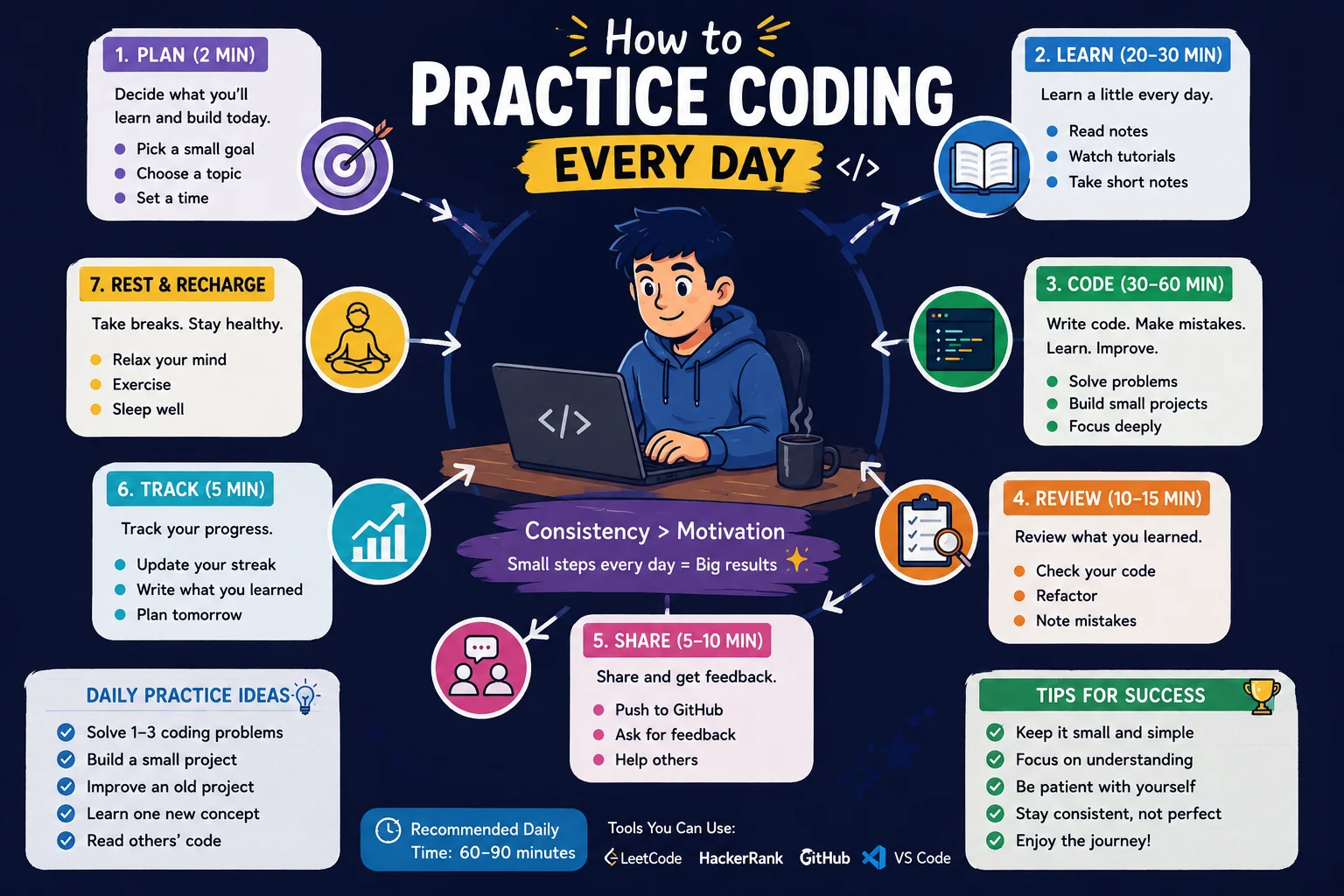
Coding practice means actively writing, running, and fixing code yourself — not just reading about it or watching someone else do it. There is a big difference between two things that feel similar but are not:
- Passive learning: Watching a video or reading an article about coding. You understand it while it’s happening, but you haven’t actually done it yourself.
- Active practice: Typing the code yourself, running it, breaking it, and fixing it. This is where real learning happens.
A simple definition to remember: practicing coding means using a programming language to solve small problems on your own, regularly, until the actions stop feeling difficult and start feeling automatic. Psychologists call this kind of focused, structured repetition deliberate practice — the same principle musicians and athletes use to improve, applied to programming logic and syntax instead of scales or sprints.
Why Daily Practice Matters More Than Long Study Sessions
Most beginners think “more hours equals more progress.” But research on how the brain learns new skills shows something different: spaced-out daily practice beats occasional long sessions almost every time.
Here’s why. Your brain stores new information in short-term memory first. If you do not use that information again soon, it fades — this is called the forgetting curve. If you code for five hours on a Sunday and then don’t touch a keyboard until the next Sunday, your brain quietly deletes most of what you learned. But if you practice for 20–30 minutes every day, you are reviewing and reinforcing that knowledge before it fades. This technique is called spaced repetition — the same principle behind language-learning apps and flashcard systems, applied to syntax and logic instead of vocabulary. It works alongside active recall: trying to remember something from memory, rather than immediately looking it up. It feels harder in the moment, but that small struggle is exactly what strengthens the memory.
💡 Key Idea: 30 minutes a day for 7 days will teach you more than one 3.5-hour session once a week — even though the total time is exactly the same.
A Real-Life Analogy: Coding Practice Is Like Learning a Language
Think about how people actually become fluent in a new spoken language. Nobody becomes fluent in French by reading a French textbook for six hours once a month. They become fluent by using a little bit of French every single day — a few words at breakfast, a short conversation, a song, a sentence in a text message.
Coding works exactly the same way. Programming languages are still languages, with their own vocabulary (keywords and functions) and grammar (syntax). The more small, daily “conversations” you have with code, the more natural it becomes to read and write it. Eventually, recognizing common patterns — like a loop or a conditional — starts to feel almost like muscle memory, even though it’s really your brain pattern-matching code structures it has seen many times before.
The Gym Analogy
Here’s a second way to think about it. Going to the gym once for five hours will leave you sore and exhausted, and you probably won’t go back for two weeks. But going to the gym for 30 minutes, four or five times a week, builds real strength over time — and it’s sustainable. Coding practice works on the same principle: small consistent reps build long-term strength, not occasional bursts of intensity.
Visual Explanation: The Daily Practice Loop
Every good practice session, no matter how short, follows the same basic loop. Here is what that loop looks like:
| Step | What You Do | Roughly How Long |
|---|---|---|
| 1. Review | Quickly look back at what you learned yesterday | 5 minutes |
| 2. Learn | Learn one small new concept or read one short lesson | 10 minutes |
| 3. Build | Write code yourself using what you just learned | 15–20 minutes |
| 4. Break & Fix | Intentionally make an error, then find and fix it | 5–10 minutes |
| 5. Reflect | Write one sentence about what you learned today | 2 minutes |
You don’t need all five steps every single day — but the more of this loop you complete, the more your practice “sticks.” Beginners often skip straight to step 2 and never reach step 3, which is the most important step of all.
How a Beginner Practice Session Actually Works
Let’s break this down into something you can use starting today. A good beginner practice session usually includes four different types of practice, mixed together:
1. Concept Practice
This is learning something new — like what a variable is (a labeled container that stores information, such as a name or a number) or what a loop is (code that repeats an action automatically). You don’t need to learn five new concepts a day. One is enough.
2. Retrieval Practice
This means trying to remember something without looking it up first, using active recall. For example, before checking your notes, try writing a loop from memory. Struggling a little is normal — it’s actually a sign that your brain is strengthening that memory.
3. Applied Practice
This is using a new concept to build something small and real, even something tiny like a program that adds two numbers together. This is where “knowing about code” turns into “knowing how to code.” Short, repeatable practice problems like this are sometimes called coding kata — small exercises designed to sharpen one specific skill at a time.
4. Debugging Practice
A bug is an error in your code that stops it from working correctly. Debugging is the process of finding and fixing that error. Beginners often see bugs as failure — but professional programmers spend a huge amount of their time debugging. Practicing this skill on purpose, every day, is one of the most underrated beginner habits.
Code Examples You Can Use to Practice Today
Here are three real, beginner-friendly examples (written in Python, a beginner-friendly programming language) that show what a daily practice session can look like.
Example 1: A 15-Minute Daily Micro-Exercise
This short program checks if a number is even or odd. It’s small enough to finish in one sitting, but it uses three core concepts: variables, conditionals, and output.
number = 7

if number % 2 == 0:
    print("This number is even.")
else:
print("This number is odd.")What’s happening here: number = 7 creates a variable called number and stores the value 7 inside it. The % symbol is called the modulo operator — it divides two numbers and gives you the remainder. Since 7 divided by 2 leaves a remainder of 1 (not 0), the condition number % 2 == 0 is false, so the program runs the else part and prints “This number is odd.”
Before writing any code, it can help to plan it out in pseudocode — a plain-English outline of your logic, written before you worry about exact syntax. For this example: “If the number divides evenly by 2, say it’s even. Otherwise, say it’s odd.” This habit trains you to think through the algorithm (a step-by-step set of instructions for solving a problem) before getting stuck on syntax details.
Example 2: A Weekend Mini-Project Built From Daily Reps
After a week of daily 20-minute sessions, you can combine what you learned into something bigger, like a simple calculator:
first_number = 10
second_number = 5

addition = first_number + second_number
subtraction = first_number - second_number

print("Addition result:", addition)
print("Subtraction result:", subtraction)This project doesn’t use any concept you haven’t already practiced individually — it just combines variables and math operations into one small, satisfying program. This is exactly how real developers build bigger things: small daily pieces, joined together.
Example 3: A Debugging Practice Snippet
Try to find the mistake in this code before reading the explanation below it:
age = 16

if age >= 18
    print("You are an adult.")
else:
    print("You are a minor.")
The bug: the first line of the if statement is missing a colon (:) at the end. In Python, every if and else line must end with a colon — it’s part of the language’s syntax (the required grammar rules of how code must be written). Running broken code like this usually triggers an error message pointing to the exact line — learning to read those calmly is itself a daily practice skill. The fixed line should read: if age >= 18:
Practicing on broken code like this, on purpose, trains your eyes to spot errors faster — a skill you will use every single day as a programmer.
Step-by-Step: How to Build Your Daily Coding Practice
Step 1: Choose a Time and Protect It
Pick a specific time of day — morning coffee, lunch break, before bed. The exact time matters less than picking one time and sticking to it, so it becomes automatic instead of something you have to decide on every day.
Step 2: Pick One Language and One Resource
Don’t jump between five different tutorials and three different languages. Pick one beginner-friendly language (Python and JavaScript are common first choices), a simple code editor to write it in (VS Code is a popular free option), and one main practice platform — such as freeCodeCamp, Codecademy, or Exercism — and commit to it for at least a few weeks.
Step 3: Start With a 5-Minute Review
Before learning anything new, glance back at yesterday’s code or notes. This single step is what makes spaced repetition work.
Step 4: Learn One New Thing
Just one. A single new concept, properly understood and practiced, beats five concepts skimmed and forgotten.
Step 5: Apply It Immediately
Use the new concept in a tiny program you write yourself — even five lines is enough. Try sketching it in pseudocode first if the logic feels tricky.
Step 6: Keep a Practice Log
Write one or two sentences after each session: what you learned, what you built, what broke. This takes two minutes and gives you visible proof of progress, which matters a lot for motivation.
Step 7: Build Something Bigger Once a Week
Combine the week’s daily concepts into one slightly larger project, like the calculator example above.
Step 8: Revisit Old Concepts Every Few Days
Don’t just move forward. Every few days, briefly redo an exercise from a week ago. This is what locks knowledge into long-term memory.
Common Mistakes Beginners Make When Practicing Coding
Mistake 1: Confusing watching tutorials with practicing. Watching someone else code feels productive, but your brain barely engages. Always follow a tutorial by closing it and writing similar code from memory.
Mistake 2: Trying to code for hours instead of minutes, consistently. Marathon sessions feel impressive but usually lead to burnout within a week or two.
Mistake 3: Jumping between languages and platforms. Switching from Python to JavaScript to Java every few days resets your progress in each one.
Mistake 4: Never building anything original. This is sometimes called tutorial hell — endlessly following step-by-step guides without ever writing independent code. The fix is simple: after every tutorial, try to rebuild a smaller version of it without looking.
Mistake 5: Treating errors as failure. An error message is not a sign that you’re bad at coding — it’s the normal, expected part of the process. Professional developers see error messages constantly.
Mistake 6: Skipping review and losing old concepts. Without occasional review, even concepts you “knew” two weeks ago can feel unfamiliar again, since you’re moving back along the learning curve instead of forward.
Mistake 7: All-or-nothing thinking after missing a day. Missing one day does not erase your progress. Thinking “I broke my streak, so what’s the point” is far more damaging than the missed day itself.
Best Practices for Building a Coding Habit That Sticks
- Habit-stack it: Attach your coding session to something you already do daily, like right after your morning coffee.
- Use streaks carefully: Tracking consecutive days can be motivating — many beginners follow structured challenges like “100 Days of Code” for this reason — but don’t let one missed day make you quit completely. Restart the next day without guilt.
- Keep a simple practice journal: A few lines per day is enough to see your own growth over time.
- Take rest days on purpose: Resting occasionally is not cheating — it helps your brain consolidate what you’ve learned.
- Practice toward a real goal: Knowing you’re working toward a specific project (like a simple to-do list app) makes daily practice feel meaningful instead of random.
Real Projects Beginners Build From Daily Practice
Here are three realistic project ideas that come directly out of consistent daily practice, not from one big sitting:
- A simple notes app — built piece by piece: first just storing text, then adding the ability to view notes, then adding the ability to delete them.
- “30 Tiny Programs” challenge — write one extremely small program every day for 30 days (a number guesser, a unit converter, a simple quiz), each one slightly building on the last.
- Rebuilding the same small app in two languages — for example, building the same calculator in both Python and JavaScript, which deepens your understanding of what’s universal in programming versus what’s language-specific.
Projects like these eventually become your portfolio — proof of progress you can show later, whether for a first developer job or just for yourself. The same habits of debugging and breaking problems into logical steps also carry directly into technical interview preparation.
Practice Exercises: Try These Today
- Build your own 7-day practice plan. Write down what time you’ll practice each day and for how long.
- Write today’s practice log entry using this format: “Today I learned ___. I built ___. I got stuck on ___.”
- Find and fix the bug in this code:
if 5 > 3 print("Five is bigger")(hint: check the syntax rules from Example 3 above). - Self-check: Out of the four practice types (concept, retrieval, applied, debugging), which one do you practice the least? Plan to add it to tomorrow’s session.
Quick Quiz: Test What You Just Learned
1. What is the main difference between passive learning and active practice?
2. Why does daily 30-minute practice usually work better than one long weekly session?
3. What is “tutorial hell,” and how do you avoid it?
4. What is debugging, and why should beginners practice it on purpose?
5. True or false: Missing one day of practice ruins your progress.
Frequently Asked Questions
How long should a beginner code every day?
Most beginners see real progress with just 20 to 45 minutes a day. What matters far more than the exact number is showing up consistently, day after day.
Is 30 minutes of coding a day enough to learn programming?
Yes. Thirty focused, active minutes a day adds up to over 180 hours in a year — more than enough to build real, practical programming skills, especially compared to inconsistent long sessions.
What should I practice if I don’t know what to build?
Start with the “30 Tiny Programs” idea, or try short coding exercises on a practice platform like freeCodeCamp or Exercism. The goal isn’t size — it’s daily repetition.
Is it okay to miss a day of coding practice?
Yes, completely. Missing a single day does not undo your progress. The only real risk is letting a missed day turn into a missed week through all-or-nothing thinking.
How do I stay motivated to code every day as a beginner?
Tie your practice to a small, specific goal (like finishing a tiny project), keep a simple practice log so you can see your own progress, and remember that struggling with errors is a normal part of getting better, not a sign you’re failing.
What’s the difference between practicing and just watching tutorials?
Watching a tutorial is passive — your brain follows along but doesn’t have to retrieve or apply anything. Practicing means writing the code yourself, from memory when possible, which is where real skill is built.
Should I learn multiple programming languages at once to practice more?
No, not as a beginner. Focusing on one language until you’re comfortable with the fundamentals will get you further, faster, than splitting your attention across several languages at once.
Summary
Practicing coding every day isn’t about working harder — it’s about working consistently. Short, focused, daily sessions that mix learning, building, and debugging will take you further than occasional long study marathons. The goal isn’t perfection; it’s showing up, writing real code, making mistakes, and fixing them, again and again, until it starts to feel natural.
Key Takeaways
- Daily, short practice sessions beat occasional long ones because of how memory, the forgetting curve, and spaced repetition work.
- Real practice means writing and running code yourself — not just watching tutorials.
- A complete practice session includes four types: concept, retrieval, applied, and debugging practice.
- Knowing your basic tools (a code editor, an interpreter, and a practice platform) makes daily sessions easier to start.
- Errors and bugs are a normal, expected part of learning — not a sign of failure.
- Missing one day of practice is harmless; quitting after a missed day is what actually stops progress.
- Small daily projects can be combined weekly into bigger builds, and eventually into a portfolio.
Keep learning: Once you’ve built your daily practice habit, the next natural steps are choosing your first programming language, learning what variables are, and exploring free beginner resources and practice platforms to build your skills with.