
How to Start Coding With No Experience: The Complete Beginner’s Roadmap
To start coding with no experience, pick one beginner-friendly language (Python is the easiest first choice), install a free code editor like VS Code, write a simple “Hello World” program, and learn core concepts in order: variables, data types, conditionals, and loops. Practice daily with tiny projects instead of watching tutorials passively. Most beginners can write working programs within a few weeks.
If you’re reading this, you’ve probably typed some version of “how do I even start coding” into a search bar and closed the tab feeling more lost than when you started. That’s normal. Almost every developer you’ll ever meet started exactly where you are now: at zero, with no idea what a “variable” is or why anyone needs so many programming languages.
This guide skips the overwhelm. It walks you through what coding actually is, why it’s worth learning, and the exact steps to take in your first weeks. Every technical term gets explained the moment it shows up.
What Does “Coding” Actually Mean?
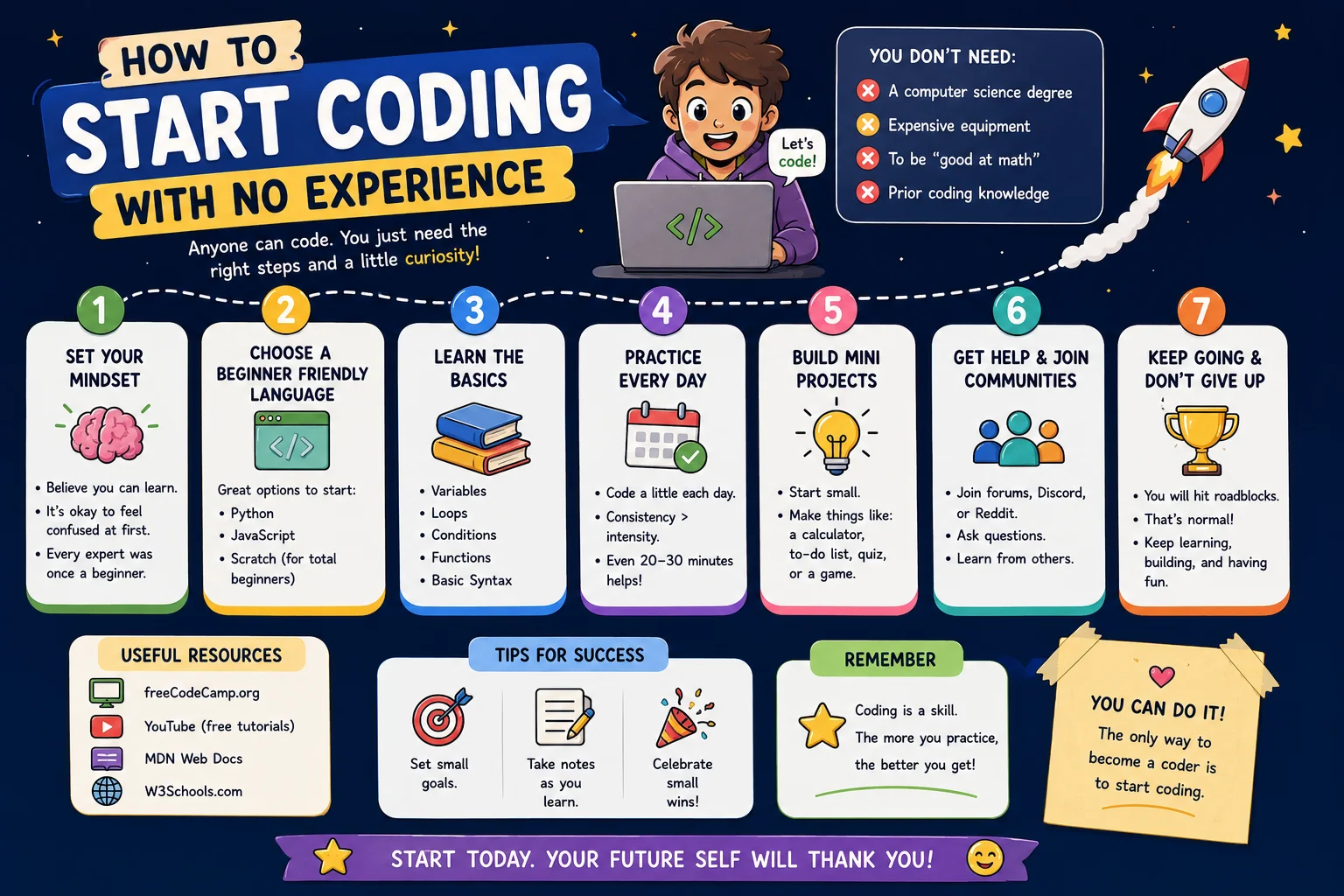
Coding (also called programming) means writing instructions that a computer can follow to do something specific, like display a webpage, calculate a number, or move a character in a game. You write these instructions using a programming language, which is a set of words and symbols that both humans can read and computers can understand.
People often use “coding” and “programming” interchangeably, and for a beginner, that’s perfectly fine. Some experts draw a small distinction: coding is the act of typing the instructions, while programming includes the bigger picture, planning what the instructions should do, organizing them, and fixing problems. That bigger picture sits inside an even wider field called software development, the full process of designing, building, testing, and maintaining programs over time, not just writing them once. You’ll meet all of these words constantly, and you don’t need to worry about the difference yet.
What matters right now is this: coding is not magic, and it’s not reserved for math geniuses. At its core, coding is applied logic, thinking clearly about cause and effect. An algorithm is simply a step-by-step set of instructions for solving a problem, the same way a recipe is an algorithm for making dinner. Coding is a learnable skill, like cooking or driving, built from small, repeatable steps.
Why It Matters
Learning to code changes what you’re capable of building on your own. With basic coding skills, you can:
- Build a website or portfolio without paying someone else to do it
- Automate boring tasks, like renaming hundreds of files or organizing a spreadsheet
- Understand how the apps and websites you use every day actually work
- Open the door to careers in web development, data analysis, or software engineering
- Solve problems by breaking them into smaller, logical steps, a skill that helps outside of coding too
You don’t need to become a professional software engineer for coding to be worth learning. Many people learn just enough to automate their job, build one useful tool, or simply understand the technology around them better.
It also helps to know, even loosely, what kind of coding exists. Front-end development is everything a user sees and clicks on in a browser, the layout, colors, and buttons. Back-end development is the behind-the-scenes logic, databases, and servers that make those buttons actually do something. Someone comfortable with both is often called a full-stack developer. Beyond web development, the same core coding skills also branch into data science (finding patterns in information) and app development (building software for phones and computers). You don’t need to pick a lane today, but recognizing these paths helps you understand where your first language might eventually take you.
A Real-Life Analogy
Coding is like writing a recipe for someone who follows instructions exactly, with zero common sense. If a recipe says “add sugar” without saying how much, a human cook might guess based on experience. A computer can’t guess. It needs you to say “add 2 teaspoons of sugar,” exactly, in an order it understands.
This is why coding feels strange at first. You’re not just solving a problem, you’re explaining the solution in exact detail to something with zero intuition. Once you get used to thinking this way, it becomes second nature.
One place this analogy breaks down: a recipe is read once and followed in order. Code can repeat steps automatically and make decisions (“if the oven is too hot, lower it”) while it’s running. You’ll see exactly how below.
How It Works: From Idea to Running Program
Every piece of code follows the same basic journey:
You write instructions
You type code in a programming language inside a tool called a code editor, a text editor built specifically for writing code (more on this below).
The computer translates your code
Computers don’t understand English-like code directly. A program called a compiler or interpreter translates your code into instructions the computer’s hardware can actually execute. A compiler translates the whole program at once before running it; an interpreter translates and runs it line by line. As a beginner, you don’t need to manage this step yourself, it happens automatically when you run your code.
The computer executes the instructions
The computer follows your translated instructions in order, producing an output, the result you see, like text on screen, a calculation, or a webpage rendering.
Visual Explanation
YOUR CODE → TRANSLATOR (compiler/interpreter) → COMPUTER RUNS IT → OUTPUT YOU SEE
Example: print("Hi") → translated → executed → Hi appears on screen
What Code Looks Like: The Same Idea, Three Languages
Different programming languages are built for different jobs, but many beginner concepts look surprisingly similar across them. Here’s the same simple idea, displaying a message, written in three popular languages, so you can see what each one actually looks like before choosing one.
Python Version
print("Hello, World!")Hello, World!JavaScript Version
console.log("Hello, World!");Hello, World!HTML Version
<p>Hello, World!</p>Hello, World!Notice the pattern: every language has its own syntax, the specific rules and punctuation it requires, but the underlying idea, “show this message,” is identical. Python uses a simple function called print(). JavaScript uses console.log(). HTML isn’t even a full programming language, it’s a markup language used to structure web pages, but it can display text too. You’re not choosing between “easy” and “hard” languages so much as choosing which job you want to do first.
Your First 30 Days: A Step-by-Step Walkthrough
Step 1: Decide What You Want to Build, Not Which Language to Learn
Most beginners start by asking “which language should I learn?” Flip the question. Ask “what do I want to build?” first. Want to build websites? Want to automate tasks or analyze data? Want to make a mobile app? Your goal points you to the right language faster than any “best language” debate ever will.
A useful habit at this stage is writing pseudocode, a plain-English outline of what you want your program to do, before touching real syntax. For example: “ask the user for their name, then greet them by name” is pseudocode. It costs nothing, catches confused thinking early, and works no matter which language you pick later.
Step 2: Choose Your First Language Based on Your Goal
If you want to build websites
Start with HTML and CSS (structure and styling), then move to JavaScript (interactivity).
If you want to automate tasks, analyze data, or just want the gentlest learning curve
Start with Python. Its syntax reads close to plain English, which is why it’s the most commonly recommended first language for beginners.
If you’re not sure yet
Default to Python. It’s beginner-friendly, widely used, and the concepts you learn (variables, loops, conditionals) transfer directly to almost every other language afterward.
Step 3: Set Up Your Coding Environment
You need a code editor, software for writing and organizing code with helpful features like color-coding and error highlighting. VS Code (Visual Studio Code) is free, beginner-friendly, and the most widely used editor in the industry. Download it, install it, and you’re ready to write your first line of code.
You may also hear the term IDE (Integrated Development Environment), a more advanced relative of a code editor that bundles in extra tools for running, testing, and debugging code in one place. VS Code sits somewhere in between, a lightweight editor that can be extended into something close to a full IDE. You’ll also occasionally use the terminal (also called the command line), a text-based way to give your computer direct instructions, like running your program or installing new tools. It looks intimidating at first, but beginners typically only need two or three commands to get started.
Step 4: Learn Core Concepts in the Right Order
Every programming language is built from the same handful of core ideas. Learning them in this order prevents confusion:
- Variables, containers that store information, like a name or a number
- Data types, the different kinds of information variables can hold (text, numbers, true/false values)
- Operators, symbols that perform actions, like math or comparisons
- Conditionals (if/else), instructions that make decisions based on conditions
- Loops, instructions that repeat actions automatically
- Functions, reusable blocks of instructions you can call by name
Step 5: Build Tiny Projects Immediately
Don’t wait until you “know enough” to build something. You never will feel ready, and that’s fine. After learning variables and conditionals, build a simple program that responds differently based on user input. After learning loops, build something that repeats a pattern. Small, ugly, working projects teach you more than perfect tutorials.
Step 6: Get Comfortable With Errors Early
You will see error messages constantly. This isn’t a sign you’re bad at coding, it’s the normal feedback loop of programming. Learning to read an error message calmly and fix the problem, called debugging, is one of the most valuable beginner skills you can build.
Step 7: Build a Weekly Practice Routine
Consistency beats intensity. Coding for 30 minutes a day, four or five days a week, builds skill faster than one exhausting six-hour session every other weekend, because programming knowledge compounds through repetition.
As your small projects start to pile up, it’s worth learning the basics of version control, a system for tracking changes to your code over time so you can undo mistakes or try new ideas safely. Git is the most widely used version control tool, and GitHub is a website where developers store and share Git projects. You don’t need either on day one, but introducing them once you have a few finished exercises gives you a safe history of your progress and a head start on a skill every professional developer uses daily.
Common Mistakes Beginners Make
Best Practices for New Coders
Real Projects Beginners Build First
- Personal portfolio website, teaches HTML, CSS, and basic page structure
- Simple to-do list app, teaches variables, input handling, and lists
- Basic calculator, teaches operators and functions
- File or spreadsheet automation script, teaches practical, real-world Python use
Practice Exercises
- Write and run your first program. Pick Python or JavaScript, and get “Hello, World!” to display on your screen.
- Pick your first language using the goal-based steps above, and write down why you chose it.
- Install VS Code and confirm you can create and save a new code file.
- Outline one beginner project idea from the list above in plain English, before writing any code at all.
Quiz: Are You Ready to Start?
1. What is a programming language?
- A) A type of computer hardware
- B) A set of words and rules used to write instructions for a computer
- C) A type of internet browser
Show Answer
B. A programming language is a structured way to write instructions a computer can understand and execute.
2. What does a code editor do?
- A) Runs ads on websites
- B) Helps you write, organize, and check your code
- C) Translates languages like English to Spanish
Show Answer
B. A code editor, like VS Code, is software built for writing and managing code efficiently.
3. Why should beginners choose a language based on their goal, not popularity?
- A) Popular languages don’t actually work
- B) Goal-based choices match real needs and reduce early frustration
- C) It doesn’t matter at all which language you pick
Show Answer
B. Matching the language to your actual goal (websites, automation, apps) keeps you motivated and learning relevant skills.
4. What is debugging?
- A) Deleting all your code and starting over
- B) Finding and fixing errors in your code
- C) Installing new software
Show Answer
C is incorrect, the answer is B. Debugging means identifying and fixing problems in your code, a normal and constant part of programming.
Frequently Asked Questions
Can I learn to code with no experience?
Yes. Nearly every programmer started with zero experience. Coding is a learnable skill built through small, consistent steps, not innate talent.
Is it too late to start coding at an older age?
No. People successfully start coding careers and hobbies in their 30s, 40s, 50s, and beyond. Consistency matters far more than the age you start.
How long does it take to learn coding from scratch?
Most beginners can write basic working programs within a few weeks of regular practice, and reach comfortable, practical skill within three to six months, depending on time invested.
What is the easiest programming language to learn first?
Python is widely considered the easiest first language because its syntax closely resembles plain English, reducing early confusion.
Do I need to be good at math to learn to code?
No. Most beginner and everyday programming relies on logical thinking, not advanced math. Specialized fields like data science use more math, but they’re not required to start.
Can I learn to code for free?
Yes. Free official documentation (a language’s own reference guide), practice platforms, and active developer communities like Stack Overflow make it entirely possible to learn coding without paying for courses or bootcamps. Much of the software you already use, including major programming languages themselves, is open-source, meaning its code is publicly available for anyone to read and learn from.
What should I learn first in coding?
Start with variables, then data types, operators, conditionals, and loops, in that order. These fundamentals appear in every programming language.
Is coding hard for beginners?
Coding has a learning curve, like any new skill, but it’s not inherently “hard.” Confusion early on is normal and temporary, not a sign of inability.
Do I need a powerful computer to start coding?
No. Basic coding for beginners runs comfortably on almost any modern laptop or desktop. You don’t need specialized or expensive hardware to start.
Summary
Starting to code isn’t about memorizing a language overnight. It’s about understanding what code does, choosing one language that matches your goal, setting up a simple environment, and practicing consistently with small projects. Confusion and errors aren’t signs you’re failing, they’re part of the normal process every programmer goes through.
Key Takeaways
- Coding means writing instructions a computer can follow to do something specific
- Choose your first language based on your goal, not hype or popularity
- Python is the most beginner-friendly first language for most learners
- VS Code is a free, widely-used tool for writing and organizing code
- Learn variables, data types, conditionals, and loops first, in that order
- Build tiny projects immediately instead of waiting until you “feel ready”
- Errors and debugging are a normal part of coding, not a sign of failure
- Consistent daily practice beats occasional long study sessions