
What Is Block-Based Coding vs Text-Based Coding? A Beginner’s Guide
If you’re trying to learn to code for the first time, you’ve probably run into two very different-looking worlds: one where you drag colorful puzzle-piece blocks around a screen, and one where you type lines of text that look like a secret language. Both are real coding. Both teach the same core skill — programming logic. This guide will show you exactly what each one is, how they work, and which one makes sense for you to start with.
What Is Block-Based Coding vs Text-Based Coding?
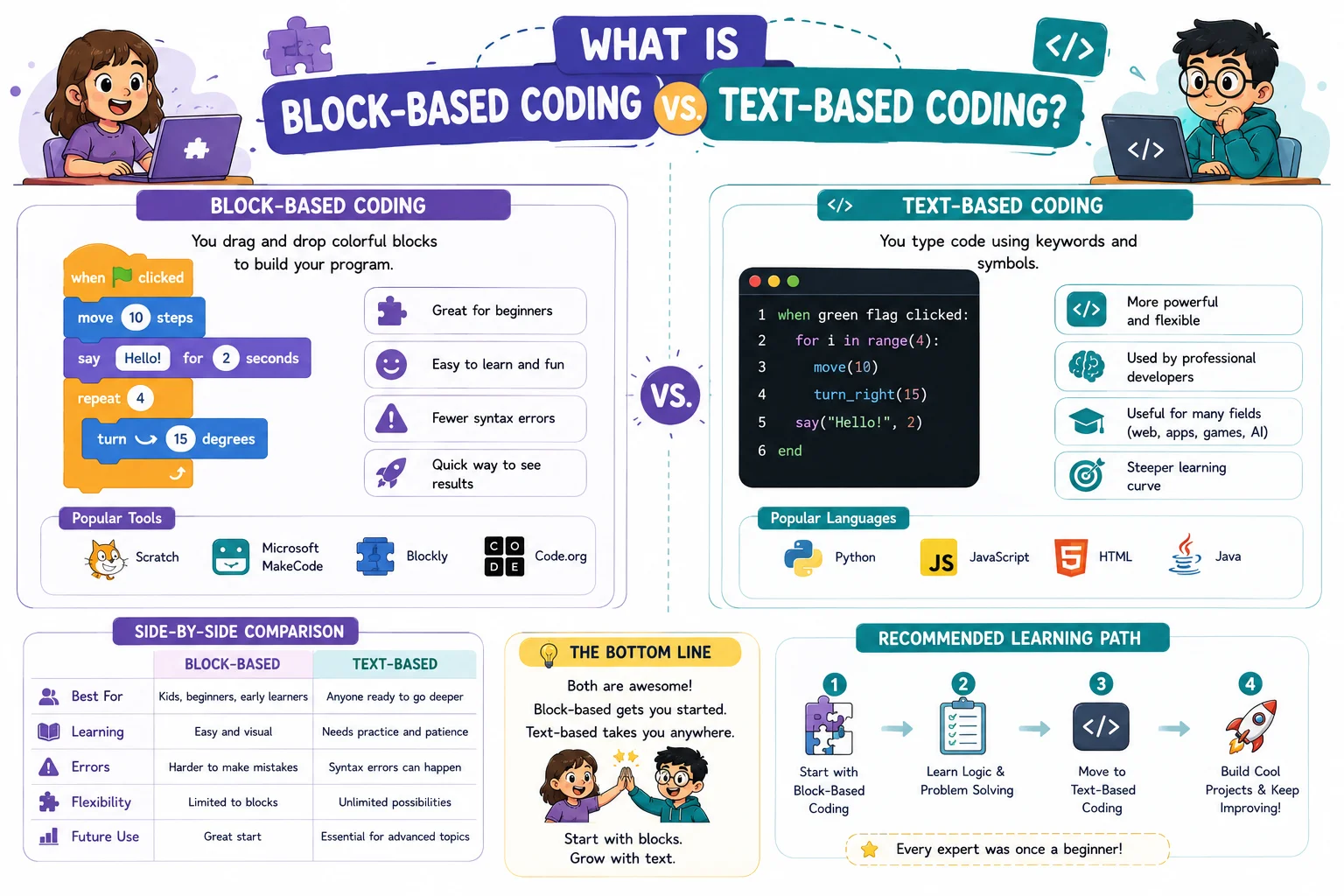
Let’s start with the simplest possible answer, because this question trips up almost every beginner.
What Is Block-Based Coding?
Block-based coding is a way of writing programs by dragging and snapping together visual blocks instead of typing text. Each block represents a piece of instruction — like “move forward,” “repeat 10 times,” or “if this happens, then do that.” You connect the blocks like puzzle pieces, and the shape of each block usually tells you where it’s allowed to fit. In computer science, this whole category is formally called a visual programming language (VPL) — programming where the structure of the program is represented graphically instead of as written text.
You’ll find block-based coding in tools like Scratch (built by MIT), Blockly (built by Google), MIT App Inventor, and Tynker. It’s also the foundation behind initiatives like Hour of Code, which introduces millions of students to programming through short, guided block-based activities. It’s the system most schools use to introduce kids to programming, but it isn’t only for kids — plenty of adult beginners use it too, just to get comfortable with how programs “think” before touching real syntax.
What Is Text-Based Coding?
Text-based coding is the traditional way of programming: you type written instructions, line by line, using a programming language with its own specific rules. Languages like Python, JavaScript, and Java are all text-based. There are no visual blocks — just text you type yourself, following exact spelling, punctuation, and formatting rules.
Many beginners discover block-based and text-based coding before they fully understand programming itself. Explore What Is Coding to learn the fundamentals first.This is what almost all real-world software, websites, apps, and systems are built with. When people imagine “a programmer,” they’re usually picturing someone typing text-based code.
The One-Sentence Difference
Here’s the easiest way to remember it: block-based and text-based coding teach the exact same logic — they just let you express that logic in two different formats. One is visual and snap-together. The other is typed and rule-based. What both formats are really building, underneath everything, is computational thinking — the skill of breaking a problem into clear, ordered steps a computer can follow. Block-based coding achieves this partly through abstraction, meaning it hides the typed syntax and lets you focus purely on the logic itself.
| Feature | Block-Based Coding | Text-Based Coding |
|---|---|---|
| How you write it | Drag and drop visual blocks | Type lines of text |
| Can you misspell something? | No — blocks only fit correctly | Yes — typos cause errors |
| Learning curve | Gentle, beginner-friendly | Steeper at first |
| Used in real software? | Rarely directly, but related tools exist | Yes, almost all production software |
| Example tools | Scratch, Blockly, App Inventor | Python, JavaScript, Java |
Why It Matters
This isn’t just a technical detail — the format you start with actually affects how you experience learning to code, and even whether you stick with it.
It Affects How Fast You Get Discouraged (or Don’t)
One of the biggest reasons beginners quit coding early is hitting confusing error messages before they even understand the logic they were trying to write. Block-based coding removes that obstacle completely, because you physically can’t connect blocks the wrong way. That means your very first experience with code can be about thinking like a programmer, not about fighting a typo.
It Affects What You Can Build
Text-based coding is what real companies use to build websites, apps, games, and software products. If your goal is a coding career, you will eventually need text-based skills. That doesn’t mean you have to start there — it just means it’s the destination, not necessarily the starting point.
Block-Based Coding Isn’t “Lesser” — It’s a Different Stage
A lot of beginners worry that block-based coding “isn’t real programming.” That’s simply not true. The logic you build in Scratch — loops, conditions, sequences — is the exact same logic used in professional software. You’re not learning something fake and then starting over. You’re learning the real skill first, in an easier format.
Real-Life Analogy
🧱 The LEGO vs Handwriting Analogy
Think of block-based coding like building with LEGO bricks. Every brick has a specific shape, and it only connects to other bricks in ways that actually work. You can’t accidentally attach a brick upside down and break the whole structure — the design prevents that mistake for you.
Text-based coding is more like handwriting a letter. You have complete freedom to write anything you want, in any way you want — but that freedom means you can also misspell a word, forget a comma, or write something that doesn’t quite make sense. Nothing stops you from making a mistake; you have to catch it yourself.
Both LEGO building and handwriting can create something amazing. They just come with different amounts of built-in safety.
How It Works
How Block-Based Coding Works Behind the Scenes
When you drag a block into place, you’re not just making a pretty picture — that block represents a real piece of programming logic. A “repeat 10 times” block is a loop. An “if/else” block is a conditional. A “move 10 steps” block is a function being called. The visual blocks are simply a friendlier costume worn by the same concepts found in every programming language.
Behind the interface, the software translates your block arrangement into actual code that the computer can run. You don’t see that step, but it’s happening — which is exactly why learning block-based coding still teaches you real programming thinking.
How Text-Based Coding Works Behind the Scenes
When you type text-based code, the computer reads your instructions line by line (or all at once, depending on the language) and tries to follow them exactly as written. There’s no built-in protection — if you misspell a command, forget a symbol, or put things in the wrong order, the program won’t run, or it will behave incorrectly. The computer is being completely literal, every time.
To actually run that typed code, the computer needs a translator. Some languages use a compiler, which converts your entire program into machine-readable instructions before running it. Others use an interpreter, which reads and runs your code line by line, on the spot. Python, for example, is interpreted, while languages like Java are compiled. You’ll usually write and test this code inside an IDE (Integrated Development Environment) or a simpler code editor — a program built specifically for writing, running, and debugging code.
Visual Explanation
Same Logic, Two Formats: “If the Player Wins, Show a Message”
Block-Based Version (Scratch-style):
Text-Based Version (Python):
if score == 10:
    print("You Win!")
Notice something important: the logic is identical. Both versions check a condition and then show a message. Only the format of writing it is different.
Same Logic in a Loop
Block-Based Version:
Text-Based Version (JavaScript):
for (let i = 0; i < 5; i++) {
  console.log("Hello!");
}
Syntax Breakdown
Does Block-Based Coding Have Syntax?
Yes — just not typed syntax. In block-based coding, the “rules” are physical: blocks are shaped so they only connect in valid ways. You can’t snap a “repeat” block where a “number” block is supposed to go, because the shapes won’t match. The puzzle-piece design is the syntax.
Text-Based Coding Syntax Basics
Text-based languages have written grammar rules. A few examples you’ll see constantly as a beginner:
- Indentation — Python uses spacing to show which lines belong together
- Brackets
{ }— Many languages use these to group blocks of code - Semicolons
;— Some languages (like JavaScript) use these to end a line - Quotation marks — Used to tell the computer “this is text, not a command”
None of this needs to be memorized right away. You’ll absorb it naturally the more code you read and write.
Why Syntax Errors Only Exist in Text-Based Coding
A syntax error happens when you break a language’s grammar rules — like forgetting a bracket or misspelling a command. Block-based coding can’t produce this kind of error, because the blocks are physically designed to prevent invalid combinations. This is the single biggest practical difference beginners notice between the two formats.
The Bridge Between the Two: Pseudocode
If you want a stepping stone between block-based thinking and text-based syntax, learn about pseudocode. Pseudocode is a way of writing out programming logic in plain, structured English — with no real syntax rules to worry about. It looks like this: IF score equals 10 THEN show "You Win!". Many beginners use pseudocode to plan a program before writing it in an actual language, and it works equally well whether you’re coming from blocks or about to start typing real code.
Code Examples
Example 1 — Saying Hello
Block-Based: A single block reading say "Hello, World!"
Text-Based (Python):
print("Hello, World!")Output:
Hello, World!
Example 2 — Storing and Using a Variable
Block-Based: A block that sets a variable called name to “Alex,” followed by a block that says "Hello, " + name
Text-Based (Python):
name = "Alex"
print("Hello, " + name)
Output:
Hello, Alex
Example 3 — A Simple Decision (If/Else)
Block-Based: An “if/else” block checking age >= 18, saying “You can vote” or “Not yet”
Text-Based (Python):
age = 20

if age >= 18:
    print("You can vote")
else:
    print("Not yet")
Output:
You can vote
Step-by-Step Walkthrough
Building “Move Forward 5 Steps” in Block-Based Coding
- Open a block-based editor like Scratch
- Find the “Motion” category of blocks
- Drag the “move 10 steps” block into your workspace
- Change the number to 5
- Click the block (or press the green flag) to run it
Building the Same Logic in Text-Based Coding
- Open a code editor (like a simple Python environment)
- Create a variable to represent position:
position = 0 - Write the instruction to add 5:
position = position + 5 - Print the result to see it:
print(position) - Run the program and read the output
Notice both walkthroughs follow the same pattern: set something up, give an instruction, and run it to see the result. That pattern is universal in programming, no matter the format.
Common Mistakes
Common Mistakes With Block-Based Coding
Mistake: Stacking blocks in the wrong order and expecting the same result as text-based code.
Order matters in both formats — a “repeat” block placed around the wrong blocks will repeat the wrong action.
Mistake: Building a huge project without testing small pieces first.
Run your blocks often, in small chunks, so you catch logic problems early instead of all at once.
Common Mistakes With Text-Based Coding
Mistake: Ignoring capitalization and spacing.
Most languages are case-sensitive, meaning Name and name are treated as two completely different things.
Mistake: Trying to memorize syntax instead of understanding logic.
You don’t need to memorize every rule. Professional developers look things up constantly — understanding the logic matters far more than perfect recall.
Mistake: Panicking at error messages instead of using them to debug.
Debugging simply means finding and fixing problems in your code. Text-based languages usually point you straight to the line that broke — read that message as a clue, not a wall.
The Biggest Mistake of All
Mistake: Treating “block-based” or “text-based” as a permanent identity instead of a learning stage.
Most people who start with block-based coding eventually move into text-based coding — and that’s expected, not a failure of either format.
Best Practices
If you’re starting with block-based coding: Try explaining your block project out loud in plain English before you build it. This builds the exact thinking skill you’ll need later for text-based code.
If you’re starting with text-based coding: Use an editor that highlights errors in real time, and read every error message slowly — they’re usually telling you exactly what’s wrong.
For everyone: Don’t wait too long to peek at text-based code, even if you’re still in the block-based stage. A small amount of early exposure makes the eventual switch feel much less intimidating.
Real Projects Using This Concept
Real Projects Built With Block-Based Coding
Millions of simple games, interactive animations, and digital stories are built using Scratch and similar tools, especially in schools. These aren’t toy exercises — they involve real logic like scoring systems, character movement, and decision-making.
Real Projects Built With Text-Based Coding
Nearly every website, mobile app, and piece of software you use daily — from social media apps to banking systems — is built with text-based programming languages.
Where Professionals Actually Use Block-Based Logic
Here’s something most beginner guides skip: block-based and visual programming aren’t only for learning. Professional game developers use a visual scripting system called Blueprints inside Unreal Engine to build real, shipped video games. Businesses use no-code and low-code tools like Power Automate and Bubble — which work a lot like block-based coding — to build real automation and apps without traditional programming. Block-based thinking doesn’t disappear once you’re a professional; it just shows up in different tools.
Practice Exercises
Block-Based Thinking (No Tools Needed): Write out, in plain English, the steps you’d need for a character to walk in a square shape. Think in terms of “move forward,” “turn,” and “repeat” — just like blocks.
Spot the Syntax Error: Look at this code and find what’s wrong: print("Hello, World!" — what’s missing?
Cross-Format Translation: If a block said “repeat 3 times: say ‘I love coding!'” — try writing what the Python version of that might roughly look like, using what you learned about loops above.
Frequently Asked Questions
Is block-based coding real coding?
Yes. It teaches the same logic — loops, conditions, sequencing — used in every programming language. The format is different, but the thinking skill is identical and completely real.
Should I start with block-based or text-based coding?
If you’re brand new and want a gentle introduction, block-based coding is a great starting point. If you’re an adult who wants to move quickly toward a coding career, you can start directly with text-based coding too — there’s no single right answer.
Can adults use block-based coding too?
Absolutely. Many adults use block-based tools to build confidence with programming logic before moving to a text-based language.
Will learning block-based coding help me learn a text-based language later?
Yes. Since the underlying logic is the same, you’ll already understand concepts like loops and conditionals — you’ll just be learning a new way to write them.
Do professional developers use block-based coding?
Some do, in specific contexts — like Unreal Engine’s Blueprints for game development or low-code platforms for business tools. It’s not the main way production software is built, but it’s far from rare.
How do I move from block-based to text-based coding?
Start by learning a beginner-friendly language like Python, and try to notice how concepts you already know from blocks — like loops and conditions — show up again in text form.
What is pseudocode, and how does it help?
Pseudocode is plain-English logic with no real syntax rules — a kind of middle step between block-based thinking and typed code. Writing pseudocode first makes the jump into a text-based language feel far less intimidating.
Summary
Block-based coding and text-based coding are two different formats for expressing the exact same programming logic. Block-based coding uses drag-and-drop visual pieces that can’t be “misspelled,” making it a gentle, beginner-friendly entry point. Text-based coding uses typed instructions with strict grammar rules, and it’s what powers almost all real-world software. Neither one is fake, lesser, or a waste of time — they’re simply two stages on the same learning path.
Key Takeaways
- Block-based and text-based coding teach the same logic, just in different formats
- Both formats build computational thinking — breaking problems into clear, ordered steps
- Block-based coding can’t produce syntax errors — text-based coding can
- Pseudocode is a useful bridge for moving from block-based thinking to typed code
- Text-based coding is what most professional software is built with, using compilers or interpreters to run
- Many professionals still use visual, block-like tools (Unreal Blueprints, low-code platforms)
- Most beginners move from block-based to text-based over time — this is normal, not a failure
Related Concepts
- What Is an Algorithm?
- What Is a Programming Language?
- What Is Syntax in Coding?
- What Is Pseudocode?
- What Is Computational Thinking?
- What Is Debugging in Coding?
- What Is Scratch? A Beginner’s Guide
- Best Programming Languages for Beginners